Tasks & follow-ups
Track action items created manually or extracted by the agent, assign them, and link them to conversations.
Tasks are action items — created manually or extracted automatically by the agent from inbound messages.
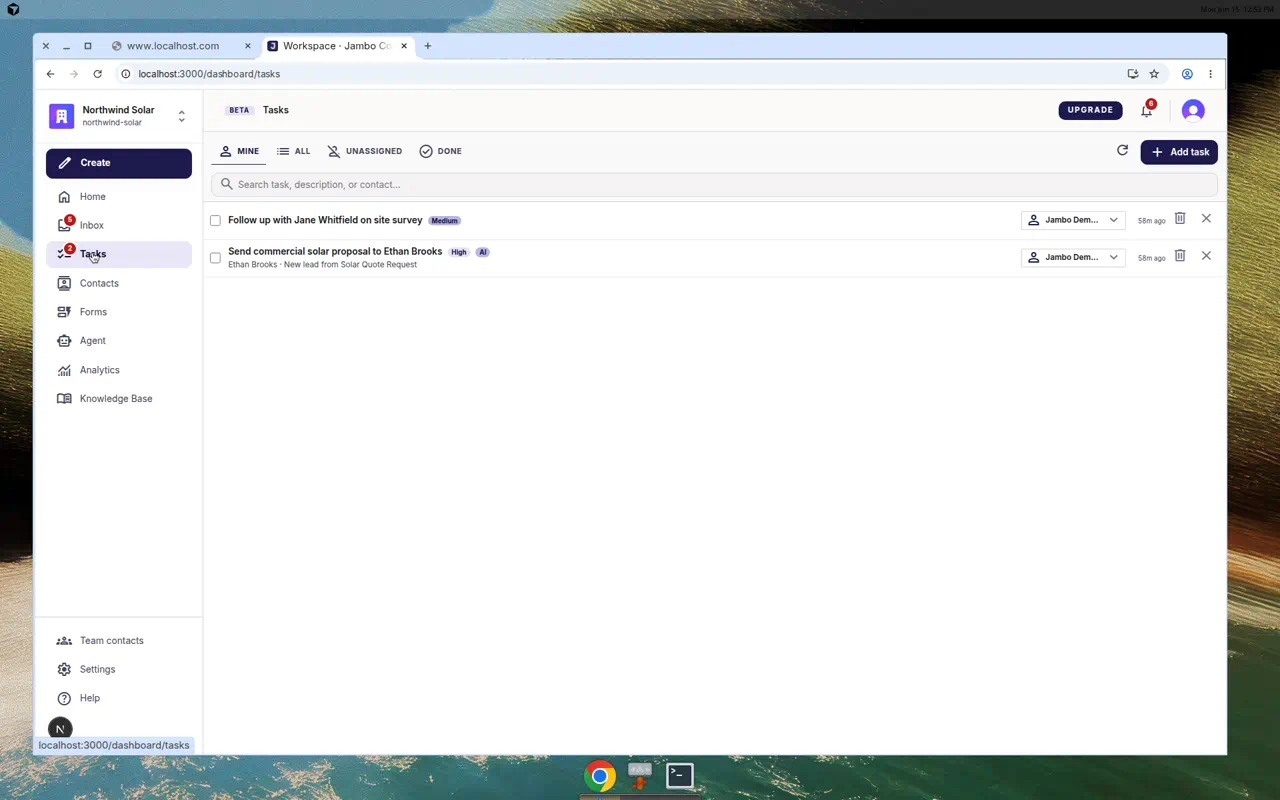
Working with tasks
- Open Tasks from the left navigation. (If hidden, enable tasks in Settings → Workspace.)
- Filter by scope: Mine, All, Unassigned, Done.
- Add task → enter "What needs to be done?", choose a priority, and click Create.
- Search by task, description, or contact.
- Tick a task's checkbox to complete it (open tasks ask for inline confirmation).
- Per task: pick an assignee, jump to the linked conversation, Cancel task, or Delete.
Automatic task extraction
If a form's Automation tab (or email automation) has Extract tasks from inbound messages enabled, the agent creates tasks from things people ask for — so follow-ups are captured without manual entry. See Set up agent automations.
Inside a conversation, a tasks panel shows the tasks linked to that thread.
More in Inbox, contacts & tasks