Webhooks
Register HTTPS endpoints, choose events, and verify the signed JSON payloads Jambo sends.
Custom webhooks let any HTTPS endpoint you control receive workspace events as signed JSON. Register them in Settings → Integrations → Webhooks.
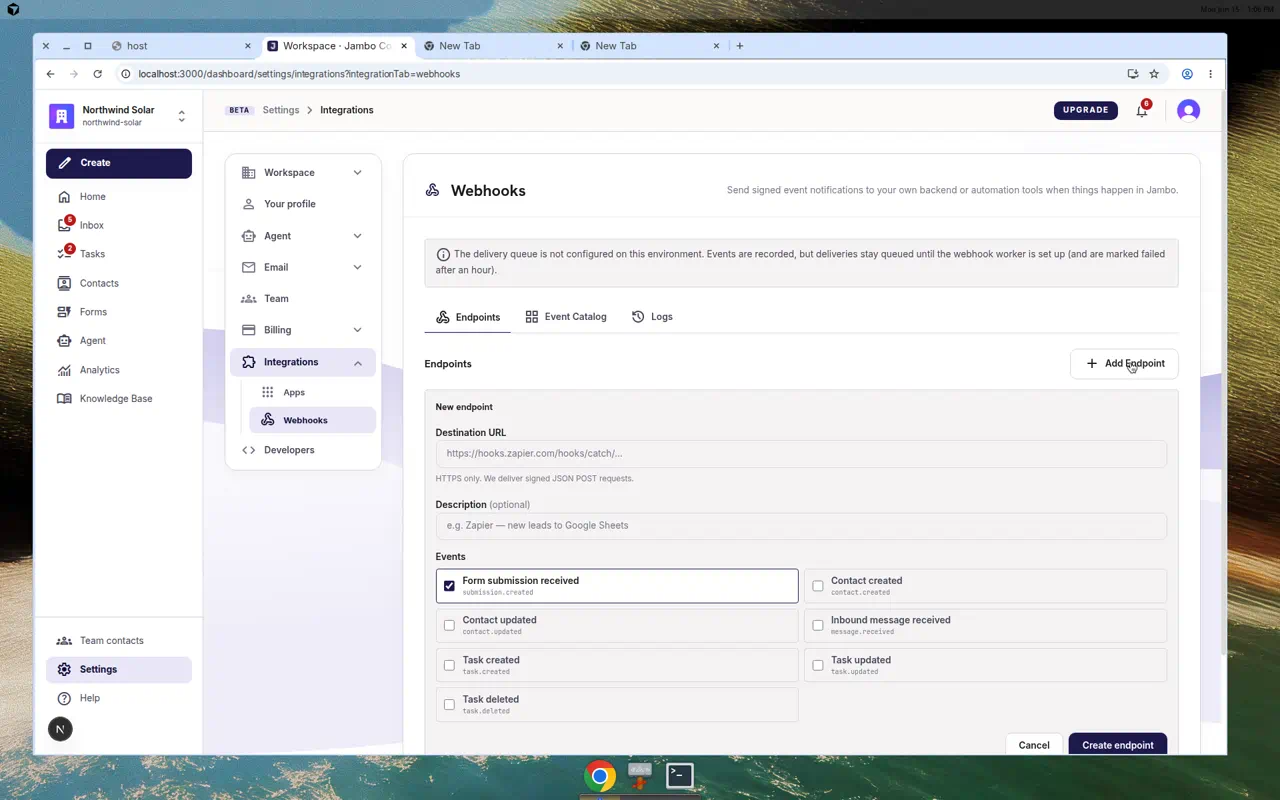
Set up an endpoint
- Go to Settings → Integrations → Webhooks.
- Add your HTTPS endpoint URL.
- Select the event types to subscribe to (see Integrations overview).
- Use Send test (
test.ping) to confirm connectivity.
Payload envelope
Outbound deliveries use a versioned JSON envelope:
{
  "id": "<event id>",
  "type": "submission.created",
  "version": 1,
  "occurredAt": "2026-06-11T10:00:00.000Z",
  "workspaceId": "<organizationId>",
  "object": { "type": "submission", "id": "…" },
  "data": { "fullName": "…", "email": "…", "formId": "…" }
}
Verify signatures
Each request is signed with HMAC-SHA256 and sent with X-Jambo-Signature and X-Jambo-Timestamp headers. On your endpoint:
- Recompute the HMAC over the raw body using your endpoint's signing secret.
- Compare it to
X-Jambo-Signature(constant-time). - Dedupe on the envelope
id— delivery is at-least-once, so the same event may arrive more than once.
Reliability
- Failed deliveries (5xx, 429, timeouts, network errors) are retried.
- After 5 consecutive abandoned deliveries an endpoint auto-pauses.
- You can replay deliveries from the webhook settings UI.
For the full event catalog, JSON samples, and the OpenAPI spec, see the in-app developer docs at /developers/webhooks and /developers/api.
To connect Jambo to Zapier without writing code, see Zapier Catch Hook webhooks — step-by-step recipes for Slack and other apps.
More in Integrations & developers